

Last verified: Aug 31, 2026
Nobody asks this question until they’ve already typed something they regret.
Usually it’s a specific moment. You paste an entire email thread to get help writing a reply, and halfway through you notice your coworker’s home address is in the signature. Or you upload a photo of a doctor’s note. Or you’re three paragraphs into describing a family situation before it occurs to you that you’ve just handed over somebody else’s medical history.
That flinch is worth paying attention to. It’s also worth doing something more useful with than closing the tab and deciding AI isn’t for you.
I use these tools every day. I’m not going to tell you to be afraid of them. But “is AI safe” is the wrong question, because it has no answer. The useful questions are narrower: where does what I type go, who can see it, how long does it stay, and what should I have said instead.
Three things happen to what you type
It gets stored. Your conversation goes to a company’s servers and gets attached to your account. This is true on every mainstream tool, on every plan, including free.
It may be used to train the model. On personal accounts at all three major tools, this is the default. You have to go turn it off.
A human may read a sample of it. This is the one that surprises people most. Some conversations get pulled for human review to check quality and catch abuse. Not most of them, and not by someone who knows you. But it is a real thing that happens, and on Google’s tools, conversations that go to human review are kept for up to three years and are not removed when you delete your activity.
None of that is a scandal. It’s how the products are built. But you should be making decisions with that in mind rather than assuming a chat window is like a private notes app.
The five-minute settings pass
Do this once, on each tool you actually use.
ChatGPT has three data settings, not one
Most advice on this topic, including most of what you’ll find searching today, is written as though there’s a single toggle. There used to be. Since ads arrived in ChatGPT in early 2026, there are three separate controls, and turning off any one of them does nothing to the other two.
They all live under Settings, then Data controls. That sounds convenient and mostly isn’t, because two of the three are on sub-pages you have to click into and then back out of. If you open Data controls, flip the one toggle you came for, and close the window, you will miss them.
All three are on by default.
1. Training. Settings, then Data controls, then “Improve the model for everyone.” This is the one every article talks about. It governs whether your conversations are used to train future models, and nothing else.
2. Ads. Settings, then Data controls, then Ads controls. The toggle is called “Personalize ads,” and its own description is worth reading closely: it lets ChatGPT use your past chats, activity, and preferences to select ads. Then it adds that ads may still be based on your current chat. So turning it off stops your history from being used, not the conversation you’re having right now.
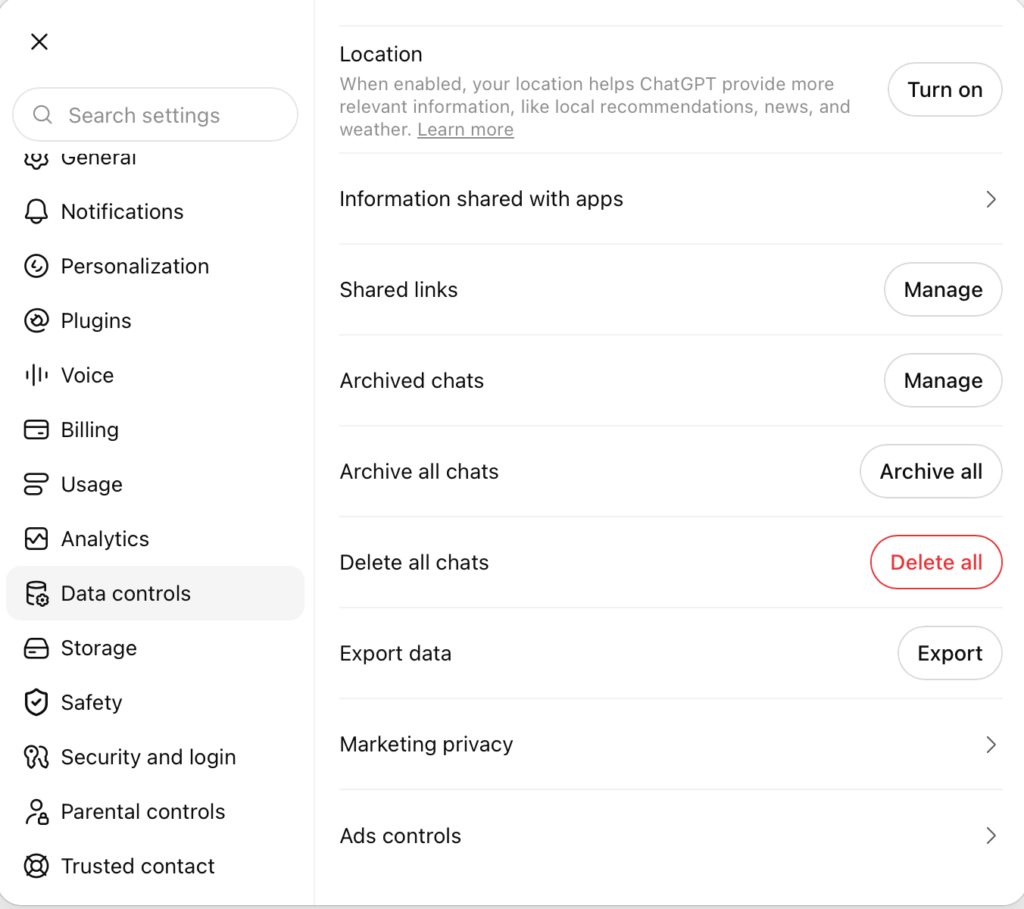
The same panel has two things worth clicking before you change anything. History shows the ads you’ve been served. Topics is the list of subjects ChatGPT has decided you’re interested in.
Go look at Topics. It takes ten seconds and it’s the most concrete look you’ll get at what these systems infer from ordinary conversation. Then use Delete ads data, which clears your history and topics and, per OpenAI’s own note, doesn’t affect your chats.
There’s also a “Change plan to go ad-free” button, which tells you where this is heading.
3. Marketing. Settings, then Data controls, then Marketing privacy. Two toggles here, both on: Marketing measurement and Personalized marketing. This one isn’t about ads inside ChatGPT at all. It’s about OpenAI personalizing and measuring its own marketing to you on other platforms.
Why this matters more than the toggle count
Your conversations are now being used for three different purposes by three different systems, and the opt-outs are not connected to each other.
Somebody who read a privacy guide last year, dutifully turned off “Improve the model for everyone,” and hasn’t looked since is not opted out of ad targeting based on their chat history. They almost certainly think they are.
That’s the actual lesson, and it’s not really about OpenAI. Settings multiply. A control you set once and filed away as handled is a control you no longer understand. This is why I put a re-check on the calendar twice a year instead of trusting my past self.
The sixty-second version
If you don’t want to think about it: open Data controls and set the training toggle how you want it. Then click into Ads controls, turn off Personalize ads, and hit Delete ads data. Then back out and click into Marketing privacy and turn off both toggles.
Look at your Topics list first, though. It’s more persuasive than anything I could write here.
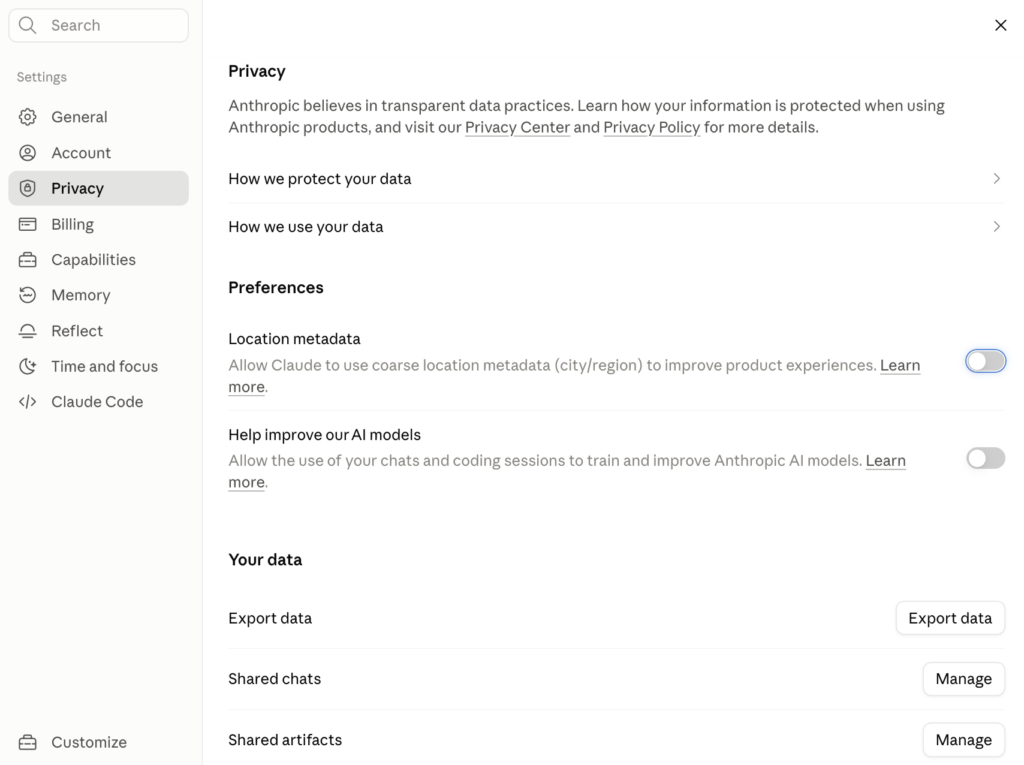
Claude
Go to Settings, then Privacy, and look for the setting about helping improve Claude. This one has real teeth attached to it. Leaving it on means your conversations can be kept in training pipelines for up to five years. Turning it off drops retention back to thirty days. If you signed up sometime after the fall of 2025, you clicked through a choice on this during onboarding, and there is a decent chance you don’t remember which way you went. Go look.
Gemini
Google bundles this differently from the other two, and it’s worth understanding before you flip anything. There are three separate controls.
Keep Activity, at myactivity.google.com/product/gemini, is the raw log of your chats. It’s on by default. Turning it off stops your conversations being used for training or sampled for human review. But it also means you lose your chat history beyond 72 hours, you lose personalization entirely, and some connected apps stop working. That’s a real cost, and it cuts out more functionality than the equivalent setting on ChatGPT or Claude.
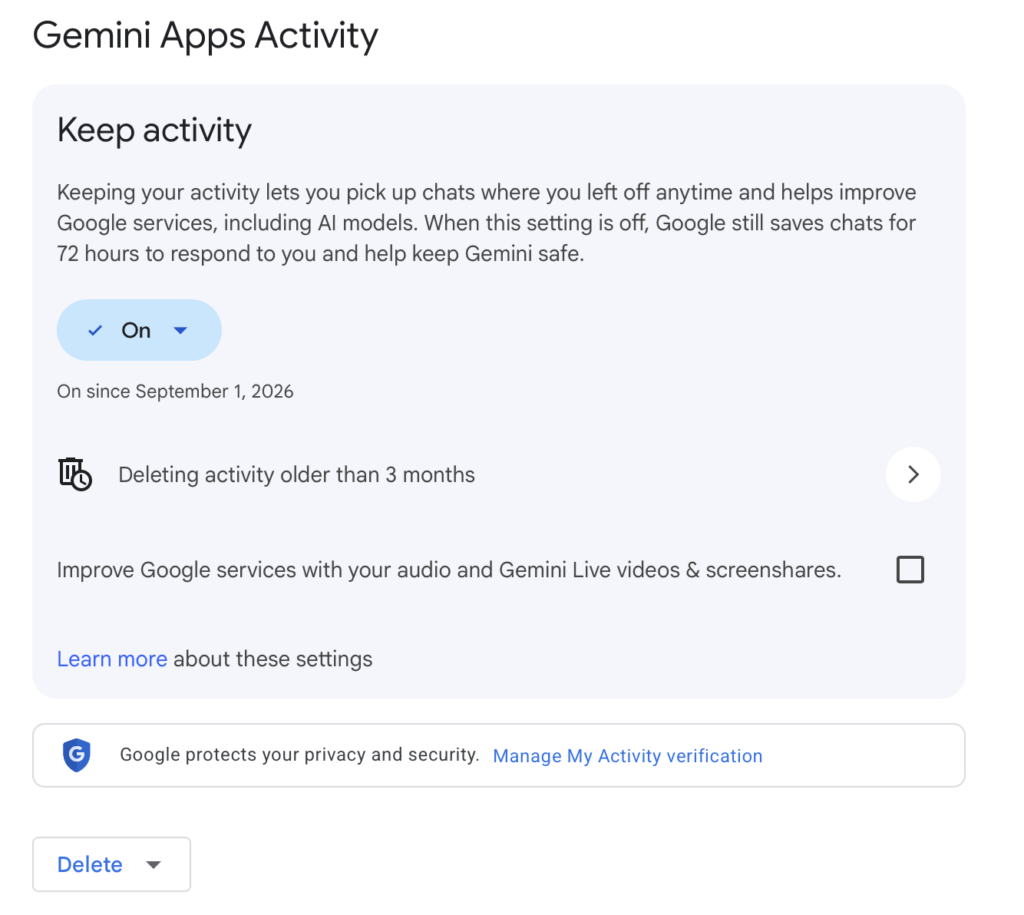 Auto-delete, on that same page, defaults to eighteen months. Change it to three.
Personal Intelligence, in Gemini’s own settings, is the automatic profile it builds from your past chats. This toggles separately, so you can stop the learning and keep your history.
What I’d actually do, and what I do: leave Keep Activity on, set auto-delete to three months, and turn off Personal Intelligence unless you want it building a profile of you. Then use Temporary Chat for anything sensitive. Temporary Chats don’t appear in your history or activity, aren’t used for personalization or training, and are kept 72 hours.
Turn Keep Activity fully off only if you barely use Gemini and would rather not think about it again. For a regular user, that setting costs more than it buys, and the auto-delete plus Temporary Chat combination gets you most of the protection without breaking the product.
What those settings do not do
I’d rather you know the limits than feel falsely protected.
They only work going forward. Anything already used for training is already used. You cannot pull it back.
They don’t stop storage or transmission. Your messages still travel to a server and still sit there. Turning off training is not encryption. On Gemini specifically, conversations are retained for roughly 72 hours even with activity fully off, because that’s how the service runs.
They don’t apply to flagged conversations. If something trips a safety system, it can be reviewed and kept regardless of your settings, at every one of these companies.
They don’t cover what you share elsewhere. A shared chat link is a public webpage. A screenshot you post to Threads is out of your hands permanently. Check your shared links occasionally; ChatGPT keeps a list of them under Data Controls.
They don’t cover connectors. If you’ve let a tool read your Gmail, Drive, or Calendar, you’ve expanded what it can see well beyond what you type. That’s sometimes worth it. It should be a decision, not something you mindlessly clicked past.
The rule that does more than all the settings combined
Here it is: describe the constraint, not the person.
Almost everything sensitive you’re tempted to type is identifying detail that does not improve the answer. The tool doesn’t need to know who someone is to help you. It needs to know what limits the situation.
| Instead of typing | Type |
|---|---|
| “My daughter Emma, she’s 7, at Lincoln Elementary, has ADHD and her teacher Mrs. Kaminski emailed me that…” | “I have a 7-year-old with ADHD, and her teacher raised a concern about focus during independent work.” |
| Pasting your full bank statement | “Our take-home is around $6,000 a month and roughly a third goes to housing.” |
| Uploading the whole lab report | Typing the two lines you actually have a question about |
| “My husband Dan works at [company] and his manager…” | “My spouse is dealing with a difficult manager.” |
Try it and watch what happens to the quality of the answer. It doesn’t drop. That’s the whole point…the identifying information was never doing any work.
This is a habit more than a rule, and it will probably take you only a couple of weeks for it to become automatic.
The short never list
Some things just don’t go in a chat box, in any tool, on any plan:
- Passwords, account numbers, routing numbers, card numbers, Social Security numbers
- Photos of driver’s licenses, passports, insurance cards, checks, or prescription labels
- Anything your employer would classify as confidential, including client information, unreleased plans, and internal documents
- Another adult’s private information that they haven’t agreed to share
- A child’s name paired with their school, their diagnosis, their photo, or their schedule
That last one is especially important and deserves its own paragraph.
The part we all get wrong: other people
You consented. Your kid didn’t.
The most common oversharing I see isn’t people exposing themselves. It’s parents pasting in a school email, an IEP, a therapist’s note, or a group chat, because they want help figuring out what to say back. The instinct is good. You’re trying to handle something well.
But the details that identify a child (full name, school, grade, diagnosis, teacher, schedule, photo) are exactly the details that don’t change the advice you get. Strip them and ask the same question. You will get the same answer, and your seven-year-old’s medical history won’t be sitting in a training pipeline for five years because of a Tuesday afternoon email.
Same logic applies to an aging parent’s health, a friend’s marriage, a coworker’s performance issue. If they’d be uncomfortable knowing you typed it, describe the situation instead of the person. Instead of copying information straight into a prompt box, paste it into a text file, remove identifying info, and use that instead.
Health, money, and legal questions
These are the three areas where people either overshare badly or avoid AI entirely, and both reactions cost them something. These tools are genuinely useful for understanding a diagnosis before an appointment, thinking through a budget, or figuring out what questions to ask a lawyer.
Do it this way:
Ask about the category, not your file. “What questions should I ask an oncologist about a stage 2 diagnosis” gets you a better and safer result than uploading the pathology report. “How do people usually structure an emergency fund on a variable income” beats pasting your account history.
Use ranges instead of exact figures. Nothing about the quality of financial advice requires your precise balance.
Use a Temporary Chat for the sensitive one-offs, so it doesn’t sit in your history for the next four years.
And keep in mind that none of these tools is your doctor, your accountant, or your attorney. They’re good at helping you arrive at an appointment prepared. That’s a real benefit BUT it’s NOT the same as advice.
Four habits worth building
Do a delete pass quarterly. Fifteen minutes, scroll your history, delete anything you wouldn’t want read aloud. Note that deletion is not instant on the back end at any of these companies, but it stops the conversation from being available going forward.
Redact before you screenshot. Every share, every post, every text to a friend.
Keep work and personal separate. If your employer provides an AI account, use it for work. Business accounts are excluded from training by default in a way personal accounts are not.
Re-check your settings twice a year. Terms change. Anthropic’s changed substantially in 2025 and defaults shifted. Google’s have moved more than once. A setting you turned off in 2024 may live in a different menu now.
What this is not
This is not an argument for using these tools less.
The people who get the most out of AI aren’t the ones who share the most. They’re the ones who’ve figured out that describing a situation clearly works better than dumping everything and hoping. Privacy discipline and good results point in exactly the same direction, which is a nicer arrangement than we usually get.
Go do the five-minute settings pass. Then go back to using the thing.
If you hit a case where you genuinely can’t tell whether something crosses the line, send it to me. The gray areas are where this gets interesting, and I’d rather write about the real ones than the ones I made up.
Subscribe and hit reply to tell me yours, or send me a note if you’d rather.
