

What’s a Project, and why you want one
Last verified: Sept. 1, 2026
Somewhere around the fourth time you type “family of five, one kid won’t touch anything green, we’re out the door by 6:15 on Tuesdays” into a fresh chat window, it stops feeling like a shortcut.
That’s because it isn’t one. Re-explaining your household every single time is data entry with extra steps.
The fix is a feature all three major tools now have, and almost nobody outside of tech circles uses. ChatGPT and Claude both call it a Project. Gemini calls it a Notebook. The name doesn’t matter. The idea is the same, and once you have one, the tool stops being a stranger you brief from scratch and starts being something that already knows the rules of your house.
What a Project actually is
Three things in one container:
Standing instructions. A paragraph or two you write once about who you are, what you want, and how you want it delivered. Every chat inside the Project starts with this already loaded.
Reference files. Documents you upload once that the tool can look at whenever it’s relevant. A school calendar. A list of your recurring bills. Your race training plan.
A home for related chats. Every conversation about that one subject lives together instead of scattered across a history you’ll never scroll back through.
The closest real-world comparison is the difference between briefing a new sitter every single time and having one who’s been coming for a year. Same person, same skills. One of them needs twenty minutes of setup and one of them already knows that the middle one melts down if dinner runs past 6:30.
Why this matters more than better prompts
Almost everything written about getting good results from AI is about phrasing. Say “act as an expert.” Add “think step by step.” Some of it helps a little.
Context helps enormously more.
A plain, unglamorous request sent into a Project that already knows your constraints will beat a beautifully engineered prompt sent into an empty window, every time. The tool isn’t guessing at your situation anymore. You gave it the situation. And over time, it learns your situation better and better.
This is also the reason the results people show off online rarely reproduce for you when you try them. They aren’t using a magic prompt. They’re twenty messages deep in a workspace that already knows what they’re working on.
What’s actually free right now
This is the part every older article gets wrong, because it has changed repeatedly and will change again.
Claude: Projects are available on every plan, including free. Free accounts can create up to five, which is more than most people need for personal use. Go to claude.ai/projects and click New Project.
ChatGPT: Projects opened up to free accounts in September 2025. Paid accounts get higher file limits per project, but the feature itself is not paywalled.
Gemini: This one needs a paragraph rather than a line, because Google has two features that look similar and are not.
Notebooks are the Gemini equivalent of a Project: a workspace that holds your chats, your files, and your instructions in one place. Google added them to the Gemini app in April 2026 and opened them to free accounts that same month. Free gets you up to 50 sources per notebook, which is far more than a household needs. Paid tiers go to 100, 300, and 600.
Gems are the thing people confuse them with. A Gem is a reusable set of instructions, closer to a saved persona than a workspace. It doesn’t keep your files or your chat history together. If what you want is the thing this article is about, you want a Notebook.
One more piece of Google housekeeping, because you’ll run into the names: NotebookLM was renamed Gemini Notebook in July 2026 and moved to notebook.google.com. It holds the same notebooks as the Notebooks section inside the Gemini app, just with more research tools attached. Two doors, one set of notebooks. Google hasn’t finished changing the name everywhere, so their own help pages currently say both.
Setting one up in ten minutes
Step 1: Pick something that repeats
The test is simple. Have you explained the same background more than twice?
Good candidates: weeknight dinners, the family calendar, one kid’s school and activity logistics, a side business, holiday planning, workout programming, aging parent care.
Bad candidate: a one-time decision. If you’re buying a car this month and never thinking about it again, a normal chat is fine.
Start with one. Not five. You’ll build better instructions on your second one because you’ll have learned what your first one was missing.
Step 2: Write the standing instructions
This is where the value lives, and it requires a bit of thought. I recommend at least these five pieces:
- What its job is. One sentence. “You help me plan weeknight dinners for my household.”
- Standing facts. The constraints that don’t change. Not who everyone is, just what limits the answer.
- What good looks like. Format matters more than you’d think. Ask for what you actually want to read.
- What to avoid. The things you’re tired of getting.
- When to ask instead of assume. This one is underrated and prevents most bad answers.
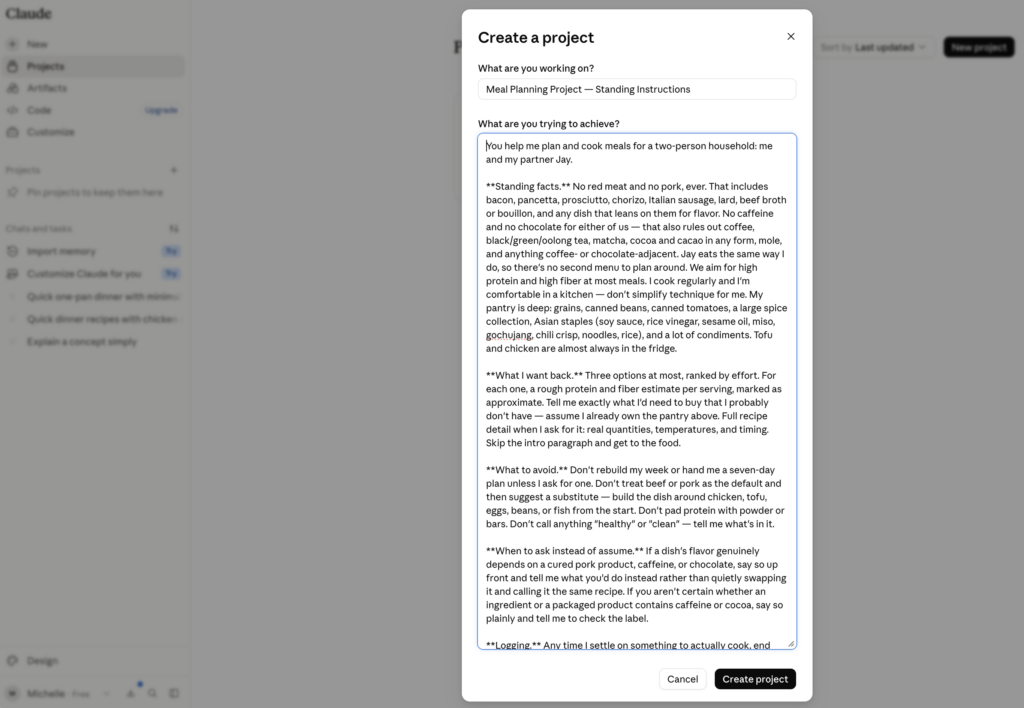
Here’s a complete example you can adapt:
You help me plan weeknight dinners.
Standing facts: five people, three of them kids under twelve. One nut allergy, serious. Nobody eats mushrooms. Weeknights I have 40 minutes maximum, and Tuesdays and Thursdays are tight because we leave at 6:15. Weekends are open. We shop once a week and there is almost always rice, pasta, eggs, canned tomatoes, and frozen chicken in the house.
What I want back: short options, not essays. Three at most, ranked by effort. For each one, tell me exactly what I’d need to buy that I probably don’t have.
Avoid: recipes with more than eight ingredients, anything requiring a specialty store, and long introductions about why a dish is wonderful.
If you need to know what’s in the fridge, ask me. Don’t assume.
Notice what’s in there and what isn’t. It knows there’s a nut allergy. It does not know anyone’s name, school, or age beyond “under twelve.” That’s deliberate, and I’ll come back to it.
Step 3: Add files, but only a few
Two or three stable documents beat twenty. The failure mode here is dumping everything you own into the knowledge base and then wondering why the answers got vague.
Things worth uploading: a school year calendar, a list of your regular meals, a training plan, a budget template you actually use.
Things not worth uploading: anything that changes weekly. A stale file is worse than no file, because the tool will confidently work from it.
Step 4: Use it for two weeks, then fix it
Your first draft of the instructions will be wrong in ways you can’t predict. That’s fine. When you get an answer that misses, don’t just correct it in the chat. Go back into the instructions and add the rule.
“Stop suggesting things that need an hour of oven time” becomes a permanent line, and you never have that conversation again.
Where people go wrong
One Project called “Life.” Too broad to be useful. The whole benefit to Projects is narrow context. Three focused Projects work better than one that tries to do everything. If you run out of projects on one platform, you can use a free account and get more on another.
Instructions written like a wish. “Be helpful and give me good ideas” tells it nothing. “Three options, ranked by effort, under 40 minutes” tells it everything.
Setting it up and never touching it again. The Projects that get genuinely good are the ones that get edited five or six times in the first month and used regularly. Your Projects use your set-up instructions in files, but it also learns from the multiple chats you have in the Project.
One thing to be deliberate about
A Project is persistent by design. What you put in the instructions sits there indefinitely, which is exactly what makes it useful and exactly why it’s worth being a little thoughtful about what goes in.
Write the constraint, not the person. “One of us has a nut allergy” gets you the same quality of answer as your kid’s name, age, school, and diagnosis, and there’s no reason to leave the second version sitting in a file on someone else’s server.
There’s a related wrinkle worth knowing before it surprises you. The private modes and Projects don’t work together. Claude’s incognito chat only runs in a new chat outside a Project. Gemini’s temporary chat can’t use Gems or connected apps. So the two have different jobs: the Project is for the recurring, unremarkable work, and when a question is sensitive enough that you don’t want it stored anywhere, you step outside the Project to ask it. Knowing which mode you’re in is the actual skill.
I wrote a whole piece on where those lines are and what the settings actually do: AI and Data Security: How to Keep Your Information Safe.
Start with one
Pick the thing you’ve explained more than twice. Give it ten minutes tonight. Write the instructions badly, save it anyway, and fix them on Thursday when it gets something wrong.
The payoff isn’t a better answer today. It’s that in three weeks, you’ll open it and it will already know.
If you set one up, tell me what you built it for. I’m collecting the ones that work, and the ones people abandon are just as useful to know about. Subscribe and hit reply to tell me yours, or send me a note if you’d rather.

Make your Project take its own notes
The reason people abandon a “what worked” list is that it’s homework. So don’t keep one. Make the Project write it.
- Add one rule to your instructions. “Any time I settle on something to actually cook, end your message with a single line in this format: LOG | date | dish | what I changed | verdict. Use TBD if I haven’t told you how it went.” That’s the whole mechanism.
- Stop thinking about it. Every chat now ends with a formatted entry you didn’t ask for and don’t have to file anywhere. It sits in the chat history in a shape that can be found later, which is the only thing that matters.
- Rebuild once a month. New chat, one prompt: “Search this project’s past chats for every line starting with LOG. Consolidate them, keep the most recent verdict for each dish, and tell me what I’m actually cooking versus what you keep suggesting.” Download what it gives you and replace the old file in the Project.
- Know the one step it can’t do. Nothing writes into a Project’s own knowledge base — not in ChatGPT, Claude, or Gemini. You upload the rebuilt file yourself. It’s thirty seconds a month, and it’s the price of the other twenty-nine days being automatic.
- One thing to check first: this depends on the tool being able to search your past chats, and that’s a setting. Test it with a throwaway LOG line before you count on it.
